
Olla: A Smart Load Balancer for your LLM Infrastructure
When you start running local LLMs at home or your work, you usually start with one box and one Ollama install. Things are simple, you’re like, this AI thing isn’t half bad and it runs on my own tin. Then you add another box, maybe an old gaming rig with a spare GPU, then a Mac with LM Studio for the MLX-friendly models, then a Linux box running vLLM for serving things at scale. Suddenly you’ve got four URLs, four model lists, four different API quirks and no way to know which one’s hot or cold.
Olla is what we built for this. A single CLI you put in front of all of them, point your client at, and forget about. It load-balances, fails over, discovers models, translates between API formats, and does all this in well under 50MB of RAM.
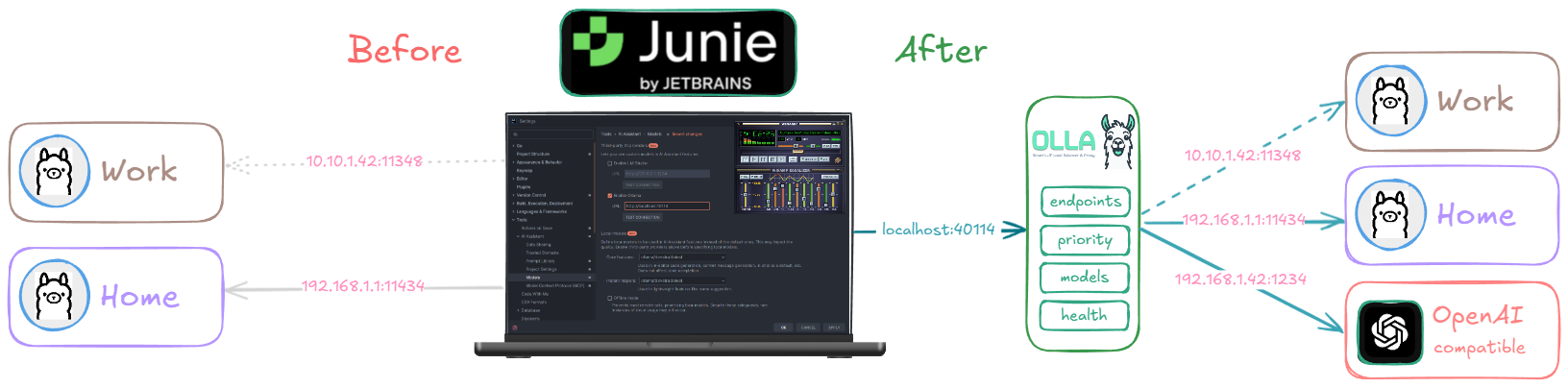
A concrete example: configure Jetbrains Junie to use the Olla endpoint, configure the inference endpoints for Olla to monitor, and you can move from your homelab to the office to fully remote and just use your laptop’s local inference whilst on the move. Junie doesn’t know anything has changed (assuming the same model is available wherever you’ve ended up).

Olla is still in its infancy (v0.0.27 released a few days ago) but used extensively, try it out and let us know what you think. It’s written in Go (v1.24) and is macOS, Linux & Windows friendly.
A bit of history
Olla started life as something simpler. A number of years back at TensorFoundry we’d built Sherpa, a small ML inference router for moving requests between training and serving infrastructure. What we didn’t expect was people using Sherpa for something quite different: load balancing between their laptop, homelab and work LLM setups. One endpoint, the right model wherever they happened to be that day. This was before LM Studio existed and when Ollama was the new shiny thing everyone wanted to run locally, because getting llama.cpp going was a bit of a challenge.
The name comes from a dear colleague of ours, no longer with us, who never quite said “Ollama”. It was always “oh let’s try it on Olla”. The name stuck. The Spanish meaning (pot) is purely coincidental, we weren’t high or anything, but you can cook up a lot when Olla is in the middle. The idea behind the project, a single sane endpoint that follows you between home, work and the road, came from watching him and others naturally drift toward that pattern with Sherpa.
Olla today is its own thing. It shares some DNA with FoundryOS, our more robust offering for corporate, enterprise and data-centre deployments, but it’s a clean-room implementation aimed squarely at the people running models on a few boxes at home, on a developer laptop, or in a small team rack. Different audiences, similar instincts.
At a glance
You point Olla at one or more inference backends (Ollama, vLLM, LM Studio, llama.cpp, SGLang, LMDeploy, Lemonade SDK, Docker Model Runner, even LiteLLM) and Olla:
- Discovers what models each backend has and unifies them into one catalogue
- Routes incoming requests to the best available backend based on priority, load and model availability
- Health checks every endpoint with circuit breakers so a dead box doesn’t tank your latency
- Pins multi-turn conversations to the same backend so the KV-cache stays warm
- Translates between Anthropic Messages API and OpenAI Chat Completions so you can use Claude Code, OpenCode, Crush and other Anthropic-shaped CLIs against any of those backends
It runs on Linux, macOS, Windows, AMD64, ARM64 (yes, including Raspberry Pi 4+) and as a multi-arch Docker image. A single binary, a single config file, and a port (40114, “4-OLLA”).
How it compares
LiteLLM is great, but it’s an API gateway aimed at unifying cloud providers. It doesn’t really solve “I have four local boxes, route to whichever one’s free.” GPUStack is excellent for full GPU-cluster orchestration but it’s a much bigger commitment and it wants to manage the whole stack. We wanted something thinner, a piece of glue that sits between your clients and your existing Ollama, vLLM and LM Studio installs and just makes them feel like one thing.
The other thing we wanted was predictable, low-overhead behaviour at high concurrency. Most LLM client traffic is long-running streaming requests, and a proxy that buffers everything or holds locks across endpoints will absolutely murder you on tail latency. So Olla does lock-free atomic stats, per-endpoint connection pools (in the high-performance engine) and streams tokens through with as little ceremony as possible.
Installing Olla
There are a few ways to get it depending on what you like.
The one-liner installer auto-detects your platform:
If you’d rather use Docker (multi-arch image, so it’ll just work on Pi 4+ too):
If you’ve got Go installed and want the latest:
Or build from source, which is what we tend to do most of the time:
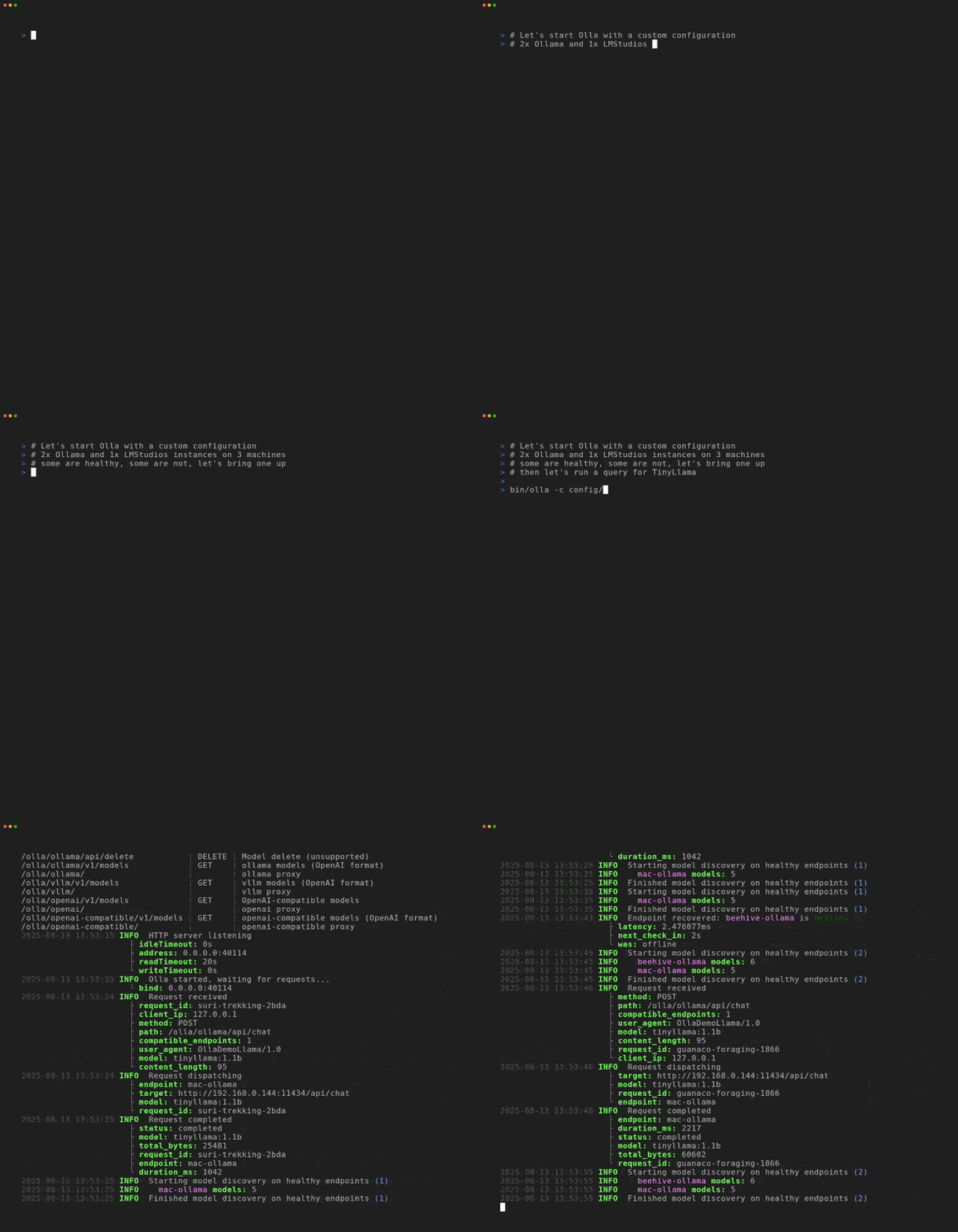
Once it’s up, point at the internal status endpoints to confirm everything’s healthy:
A simple config
Olla is driven by a single YAML config. Here’s the smallest useful one for a homelab with two Ollama boxes and a vLLM rig for the heavier stuff:
The priority field is a tie-breaker: higher numbers win when multiple endpoints can serve the model. The two Ollama boxes are at the same priority so they share load, and the vLLM rig sits slightly lower so it only gets traffic when the Ollama boxes are busy or when something explicitly wants it.
For a full reference, the configuration documentation is comprehensive.
Pointing your tools at Olla
Olla exposes a few different paths depending on what your client speaks.
For anything OpenAI-compatible (which is most things these days), /olla/proxy or /olla/openai is the universal endpoint. It’ll route to whichever backend has the model you asked for:
If you want streaming (which you almost always do for chat), tack on "stream": true. Olla will stream tokens through with minimal buffering.
For Claude Code, OpenCode, Crush and other Anthropic-shaped tools, /olla/anthropic translates between the Anthropic Messages API and OpenAI Chat Completions automatically:
For backends that natively speak Anthropic (vLLM, llama.cpp, Ollama, LM Studio, Lemonade) Olla just passes the request through. For everything else, it does the format conversion in both directions, including streaming. This means you can run Claude Code against your local llama models without changing anything in Claude Code’s config beyond the API base URL.
If you want to target a specific backend type rather than letting Olla pick, use /olla/{provider}/:
The two proxy engines
Olla ships with two proxy engines and you pick one in the config. They have very different personalities.
Sherpa is the simple, easy-to-reason-about one. Shared HTTP transport, basic failure detection, lower memory footprint. Great for development and small deployments. This was the initial engine.
Olla (yes, the engine has the same name as the project) is the high-performance one. Per-endpoint connection pools, advanced circuit breakers, larger streaming buffers (64KB versus Sherpa’s 8KB), tuned specifically for sustained LLM streaming. This is what you’d run in production or on a busy homelab.
The default is olla today. Sherpa stays maintained.
A quick rule of thumb:
| Use Sherpa if | Use Olla if |
|---|---|
| You’re testing or developing | You’re in production |
| Fewer than ~100 concurrent users | High concurrency or streaming-heavy |
| Memory is tight | You want connection pooling |
| You want simpler debugging paths | You want circuit breakers per endpoint |
Both engines support the same features (load balancing, health checks, model unification, sticky sessions). The difference is purely how they handle the HTTP plumbing underneath.
Sticky sessions and KV-cache affinity
When you’re holding a multi-turn conversation with an LLM, the model builds up a chunk of KV-cache representing your context so far. If your next turn lands on the same backend, that cache is hot and the response starts almost immediately. If it lands on a different backend, that backend has to recompute the whole thing from scratch and you eat the prefill latency every turn. It’s a real-world performance hit that’s easy to miss.
Olla’s sticky sessions feature pins repeat conversations to the same backend so the KV-cache stays warm. Turn it on with:
The trade-off is that you lose a bit of load-spreading (a chatty user who sticks to one backend is still on that one backend), but for long conversations the latency win is significant. Off by default, opt-in when you want it.
Model unification
Different backends format their model names differently. Ollama calls a quantised gpt-oss gpt-oss:120b. LM Studio with MLX calls the same family gpt-oss-120b-MLX. llama.cpp wants the GGUF filename. Across three backends you’ve got three ways to ask for the “same” model.
Olla’s model unification gives you a /v1/models endpoint that lists everything across every backend in OpenAI-compatible format. And via model aliases you can map a single virtual name to all the variants:
Now your client asks for gpt-oss-120b and Olla figures out which backend to send it to and rewrites the model name to whatever that backend expects. One name, three backends, no client changes.
Health checks and circuit breakers
Every endpoint gets continuously health checked at the interval you configure. If a backend stops responding, Olla flips it to unhealthy, stops sending traffic there and keeps probing in the background. When it recovers, traffic flows again. The high-performance Olla engine adds a circuit breaker per endpoint, so a flaky backend gets ramped back up gradually rather than instantly soaked.
There’s also automatic model-discovery refresh. When an endpoint comes back online, Olla re-queries its model list in case anything changed (you might have pulled a new model on that box while it was down).
One machine going down or one model being unloaded doesn’t take your whole setup with it. Your client just sees slightly redirected requests.
Common patterns
A few setups people are running with Olla:
- Homelab: Olla in front of multiple Ollama (or vLLM) instances scattered across your machines. One endpoint to rule them all.
- Hybrid cloud: Olla in front of your local endpoints AND LiteLLM, with LiteLLM doing the cloud (OpenAI, Anthropic, Bedrock) overflow. Local first, cloud when you need it.
- Enterprise: Olla in front of a GPUStack cluster plus standalone vLLM servers plus LiteLLM for cloud burst.
- Development: Local Ollama plus shared team endpoints plus LiteLLM for API access.
In practice, we usually leave Olla running on an LXC and forget about it (with all our endpoints configured) and point OpenWebUI at it. When there’s a new model to play with, we just reload vLLM, SGLang or llama.cpp on the relevant box, wait a few seconds, and it appears in OpenWebUI thanks to Olla’s model discovery refreshing automatically.
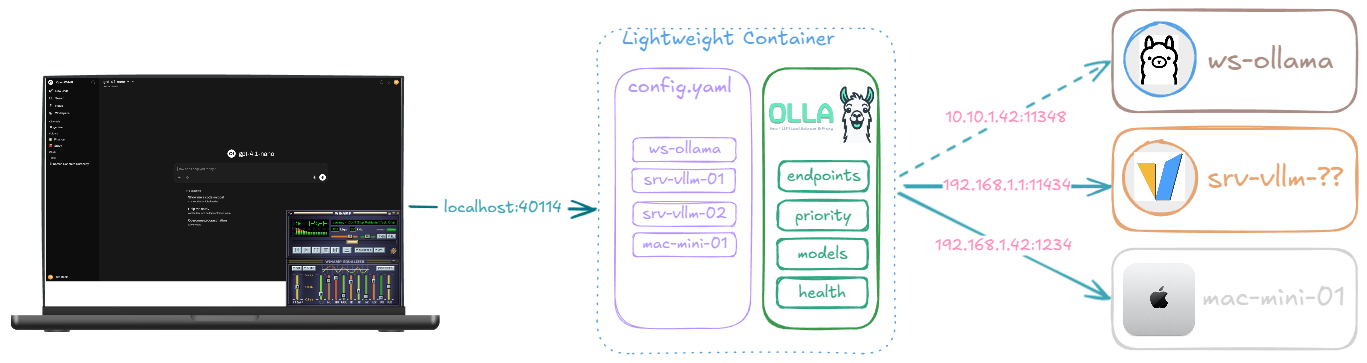
There are ready-to-use Docker Compose setups in the examples/ folder for OpenWebUI with Olla, Claude Code with llama.cpp, OpenCode with LM Studio and a few others.
For larger GPU deployments, enterprise and data-centre use, TensorFoundry FoundryOS is the heavier counterpart Olla works alongside, built for high load and full data-centre deployments.
Performance and footprint
A few things we cared about that fed into the design:
- Sub-millisecond endpoint selection. The hot path uses lock-free atomic stats so adding endpoints doesn’t degrade the selection algorithm.
- Streaming-first. The default profile auto-detects but
streamingmode does no buffering at all, tokens flow as fast as the upstream emits them. - Less than 50MB of RAM in steady state. We’ve run it on a Raspberry Pi 4 in front of beefier inference boxes and it’s perfectly fine.
- Single binary, single config. No external dependencies, no database, no Redis. State that needs to survive restarts is small enough to live in memory and re-discover on startup.
- Built for long uptimes. We’ve got Olla instances running 3-4 months in airgapped environments and still serving.
What’s next
A few things on the roadmap we’re working on or thinking about:
- More backend profiles as the ecosystem grows (the profile system makes adding new ones a config job rather than a code job in most cases)
- Better observability hooks for the provider metrics (token speeds, processing latencies)
- More API translation coverage. Anthropic Messages was the first, more to follow
The codebase is Apache 2.0 licensed. Issues, ideas and PRs welcome on GitHub.
References
- Olla on GitHub - source, releases, issues
- Olla Documentation - the canonical docs
- Getting Started Guide - step-by-step setup
- Proxy Engines explained - Sherpa vs Olla
- Integration patterns - common architectures
- Comparing Olla to LiteLLM, GPUStack and LocalAI - where each one fits
- TensorFoundry - the broader product line Olla is part of